I Asked Claude "How Is Business Today?" — How MCP Helps Me Every Day

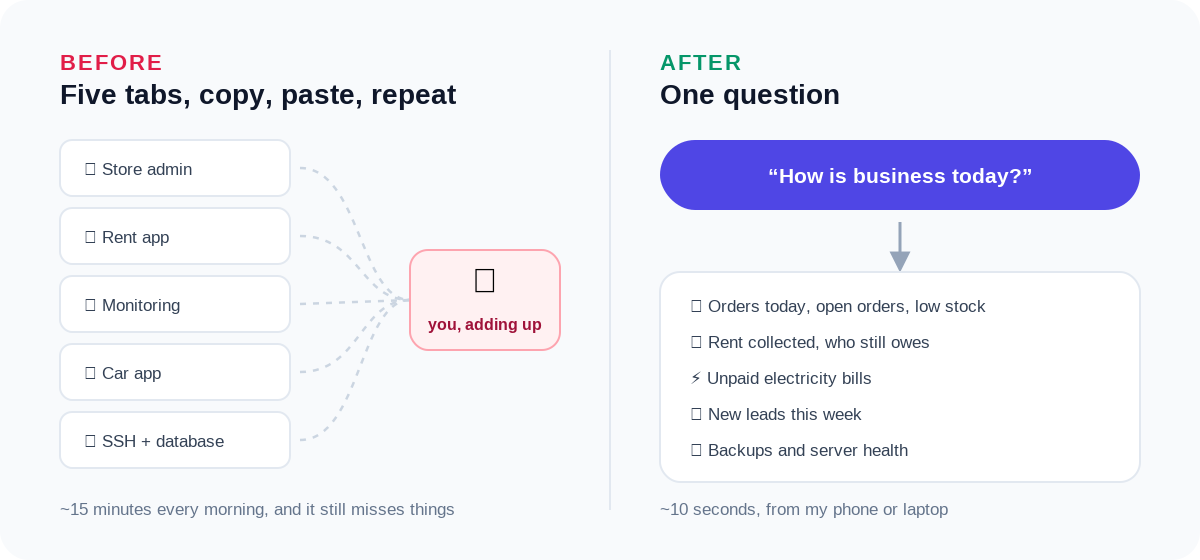
Every morning I used to do the same tour. Open the grocery store admin. Open the rent app. Check the monitoring dashboard. Open the car app. Log in to the server if something looked off. Then add it all up in my head.
Now I open Claude on my phone and type one line:
How is business today?
A few seconds later:
No store orders yet today, and nothing waiting to be packed. Five items are running low, Marino fruit cake has only 2 left. 13 of 15 rooms have paid this month's rent, two have paid part. All electricity bills are paid. Three new website enquiries this week. Last night's backup ran fine and the server is healthy.
No dashboards, no copy-paste. Just an answer.
The thing that makes this work is called MCP. This post explains what it is in plain language, and then shows what it actually changed in my day.
What is MCP, in plain words?
Claude is clever, but it knows nothing about your world: your shop, your bookings, your car, your servers. Normally you bridge that gap yourself by copying numbers into the chat.
MCP (Model Context Protocol) is an open standard that lets an AI use tools that you provide. A tool is simply a small, named ability, like "show orders for a period" or "who hasn't paid rent". Each tool has a name, a short description in plain English, and the details it needs, like "this month" or "room 14".
You ask a question in normal language. Claude reads the tool descriptions, picks the right one, uses it, and explains the answer like a colleague would.
The easiest way to think about it: MCP is a USB port for AI. Once your systems have an MCP "port", any AI app that supports MCP can plug in: Claude on the web, on your phone, or in a developer's terminal.

The most important part: Claude never gets direct access to your systems. It can only use the tools you chose to offer, and it only sees what those tools return. You stay in control.
What I connected
I run a small grocery store, a rental house with 15 rooms, a few websites, and I drive an MG Hector that reports every trip. All of it runs on one server. So I gave Claude tools for all of it, 27 of them, and every one of them can only read, never change anything.
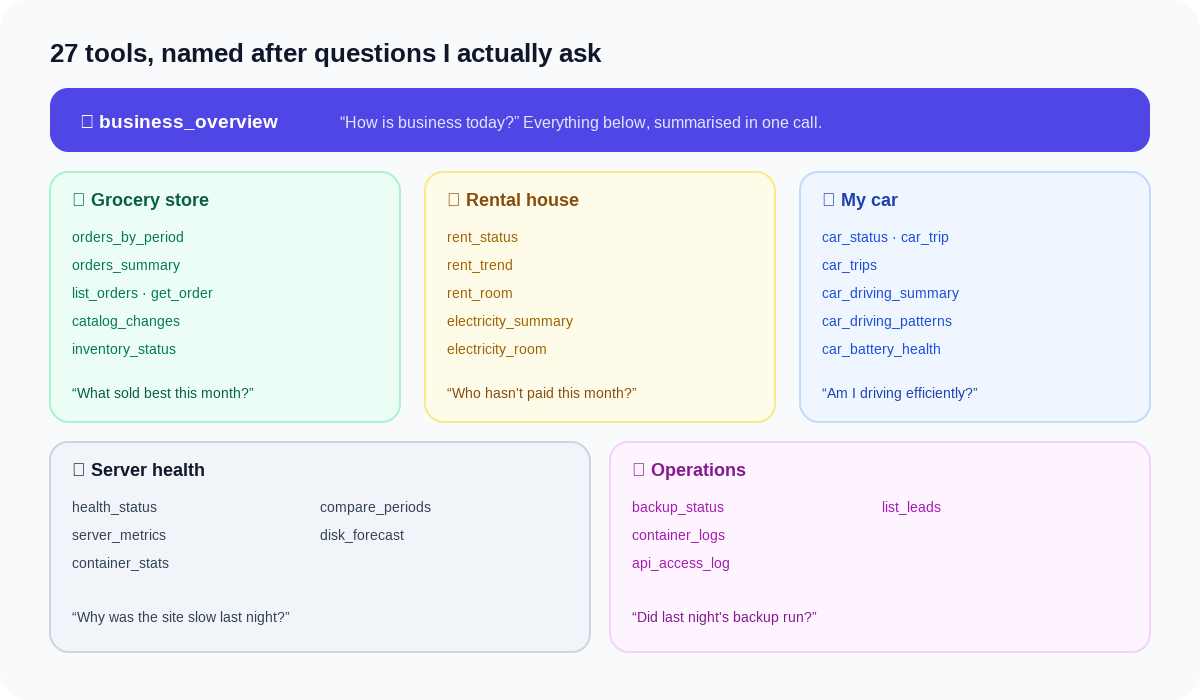
Rather than building something new, I added MCP to the backend that already powers my apps and dashboards. So Claude gets exactly the same numbers my dashboards show, never a slightly different version.

A normal day with it
This is where it really earns its place. Not as a clever demo, but as a dozen small moments a day where I just ask instead of hunting.
☕ 7:30 am — the morning check
"How is business today?"
One answer covering sales, open orders, stock, rent, bills, website enquiries, backups and server health. This used to take me about 15 minutes across five apps. Now it takes the time to finish a sip of coffee, and nothing gets missed because I forgot to open one of the apps.
🛒 10 am — keeping the shop stocked
"What's running low?" gives me the items close to running out before a customer finds an empty shelf, so I can reorder in time.
"Did anything change in the store this week?" tells me which products were added, which prices changed (old and new), and who changed them. "3 products added: rice, moong dal and jeera. One price went up. Nothing removed." When more than one person helps run the shop, this is gold.
"What sold best this month, and how does it compare with last month?" helps me decide what to keep in stock and what to promote.
📞 Midday — a customer calls
"Where is Ravi's order from this morning?" gives me the status, items, delivery slot and payment in one reply, while the customer is still on the line. No laptop, no logging in to the admin.
🏠 Start of the month — rent and bills
"Who hasn't paid rent yet?" lists every room's status, including part-payments and anything carried over from last month, so I know exactly who to remind, and how much to ask for.
"Have the electricity bills come in? Who owes what?" gives me each room's latest bill and whether the tenant has paid it.
🚗 Evening — the car
This is the part I didn't expect to use so much. My car already records every trip: distance, fuel, speed and a driving score. But that data sat unread inside an app. Now I can simply ask:
"How much diesel did I burn this month, and what did it cost?"
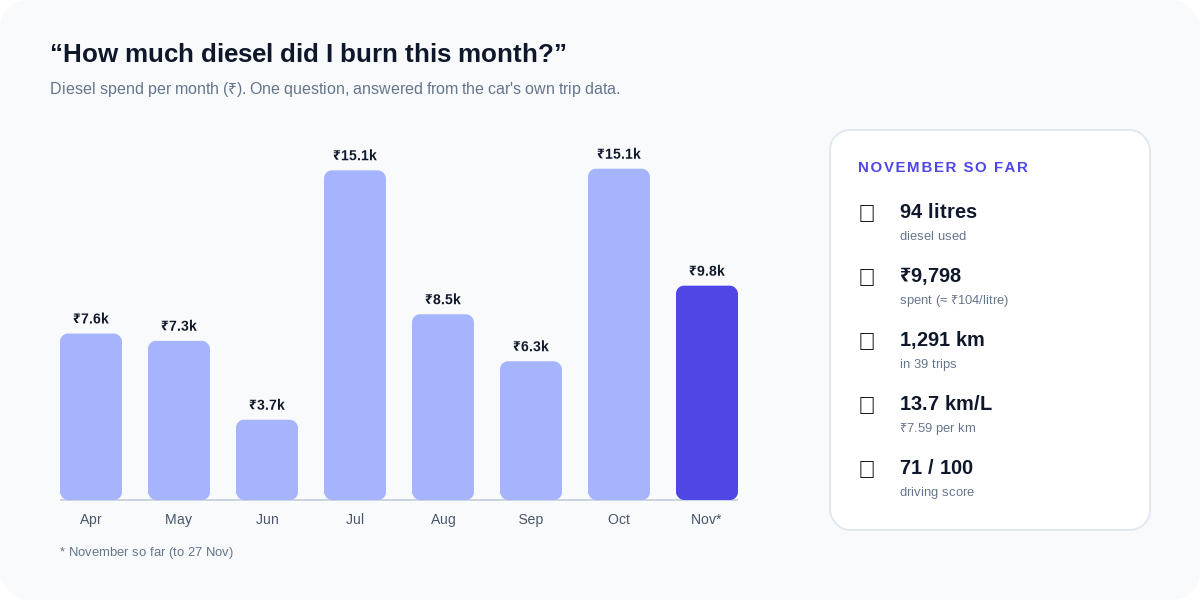
So far this month: 94 litres of diesel for ₹9,798 (at about ₹104 a litre), over 1,291 km in 39 trips. That's 13.7 km per litre, or about ₹7.59 for every kilometre I drive. Knowing the cost per km changes how I think about "quick" trips.
"Am I driving efficiently?" Claude looked at 477 trips from the last 12 months and found a pattern I'd never have spotted myself:
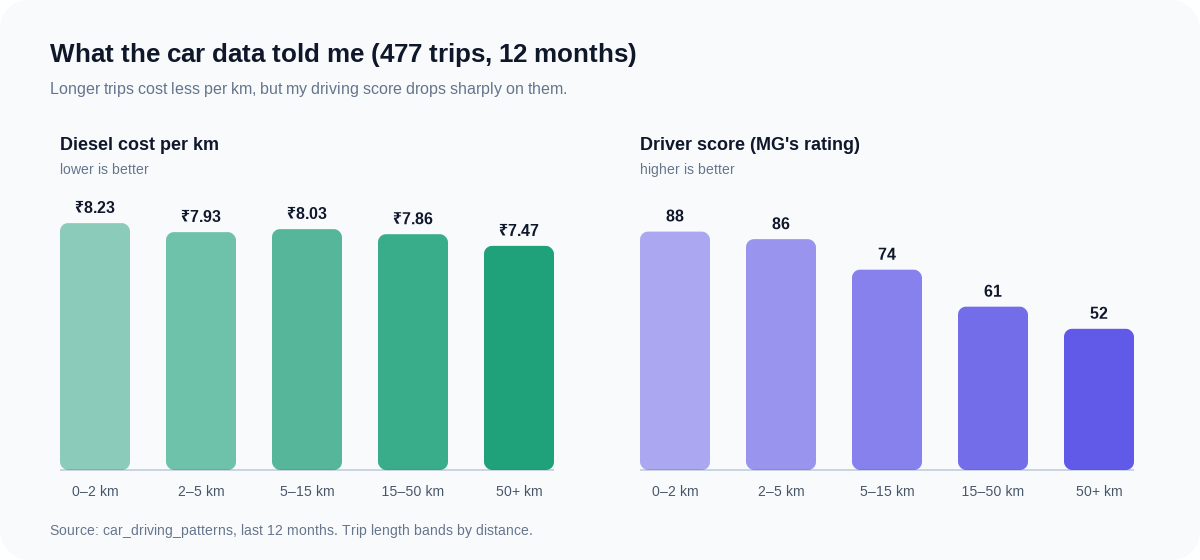
Long highway trips are the cheapest per kilometre (₹7.47 vs ₹8.23 for short hops), but they're also where my driving score drops sharply, mostly from harsh braking and speeding. One in five trips goes over 100 km/h, and Friday to Sunday make up three quarters of everything I drive. That's a conversation I now have with myself before every weekend trip.
And the practical ones: "Is the car's battery OK?", "How much fuel is left and what's the range?", "Where did I park?" All answered without opening the car app.
🌙 Night — peace of mind
"Did last night's backup run?" and "Is the server OK? Why was the site slow earlier?" Claude compares tonight with a normal week and tells me if anything looks unusual. If everything is fine, I hear it in one line and stop worrying.
Using it from my phone
Most of those moments happen away from my desk, so the Claude app on my phone matters most. Connecting it needed a proper, secure sign-in, the same kind you see when an app asks "Allow access to your Google account?".

It took one minute: paste the address into Claude's settings, approve access on a page my own server shows, done. I never gave Claude a password. It gets a temporary pass that renews itself, and I can cancel it at any time.
Keeping it safe
My tools can see customer names, phone numbers and addresses. "Read-only" is not the same as "harmless", so I treated it like any other door into my systems:
- Look, don't touch. Nothing Claude can use is able to change, delete or restart anything.
- Every request must sign in. No sign-in, no answer.
- Minimal records. My logs note which tool was used, never what was asked or answered.
- Secrets stay hidden. Passwords and keys are masked before anything reaches Claude.
- Limits on repeated requests, so nobody can hammer it.
- Manners. Claude is told not to repeat phone numbers or addresses unless I specifically ask.
Lessons I learned the hard way
1. Build tools around questions, not around data. My first tools were like database tables: "list orders", "list products", "list bills". Claude had to combine four of them to answer one question. A single tool that answers "how is business today?" gives better answers, faster.
2. Time zones and calendars will catch you out. My server runs on universal time, my business runs on India time, and "this month vs last month" has to mean whole calendar months. Claude once compared November with "2 to 31 October", which is how I found that bug.
3. Sometimes the data simply isn't there. I asked "which products were removed this week?" and there was no answer, because a deleted product left no trace. The fix wasn't in the AI: the store now keeps a small history of changes. AI is only as good as the data behind it.
4. Test with real data, safely. I tried every tool on a private copy of my real data and compared the answers with my dashboards before switching anything on.
5. Apps remember the old toolbox. After adding new tools, Claude's app kept showing the old list until I reconnected it.
What changed for me
- Time: the morning check went from about 15 minutes to a few seconds.
- Fewer surprises: low stock, unpaid rent and failed backups reach me before they become problems.
- Faster replies: customers get an answer about their order while they're still on the phone.
- Money awareness: I know what my car costs per kilometre, and how much my weekend driving adds up.
- Curiosity: when an answer costs ten seconds instead of ten minutes, you ask more questions. That's how I discovered most of the insights above.
For a small business owner, that's the real promise of MCP: not a fancy chatbot, but your own data, available as a conversation, wherever you are.
How to start
You don't need 27 tools. Start with one question you ask every single day, and give Claude one read-only tool that answers it from data you already trust. Use it for a week. Then add the next question.
The technology is the easy part. The real work is choosing the right questions, making sure the answers match what you already believe, and being careful about what you share.
Happy building!
Let's build your next system right.
A short call is often enough to check feasibility, compare architecture options, and agree on a realistic delivery plan. Direct 1-on-1 collaboration with zero agency overhead.